Wires
The four kinds
A wire’s kind decides how it is drawn, and Quickdraw picks it from the ports you joined rather than asking you.
| Kind | Carries | Drawn as |
|---|---|---|
analog |
Coax, BNC, SMA — any analog or RF electrical signal | A plain line |
digital |
Logic, clocks, data buses | A plain line, in the digital colour |
optical |
Light in fibre | A smoothly curved run, the way fibre lies |
beam |
Light in free space | Dead straight, with a fold-mirror tick at every turn |
The two optical kinds look different because they are different: fibre bends, and a free-space beam only changes direction when something reflects it. A beam that turns a corner gets a mirror drawn on the corner, because that is what would be there.
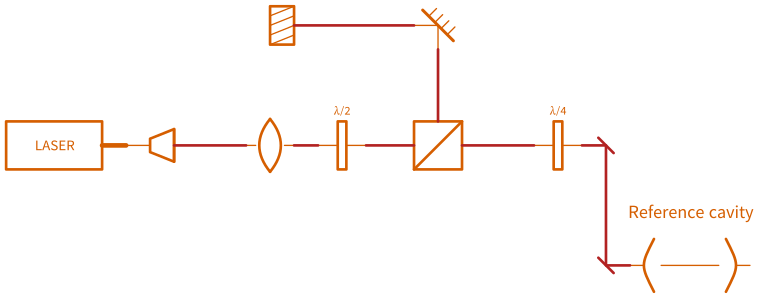
free_space.dsd — every corner in the beam path carries its fold mirror.
Components that convert between domains set this up for you. A photodiode has an optical input and an electrical output, so wires either side of it are drawn correctly with no intervention. A collimator bridges fibre and free space the same way.
You can override a wire’s kind in its properties if you need to.
Routing
Quickdraw routes wires around your symbols. Move a symbol and every wire touching it re-routes immediately.
What counts as an obstacle is the symbol’s drawn extent including its label — so moving a label out of the way genuinely moves the wires out of the way too, which is occasionally the easiest fix for a cramped corner.
Waypoints
When the automatic route is not the one you want, right-click the wire where you want it to go and choose Add waypoint here. The wire is pinned through that point and routes around obstacles on either side of it. Clear waypoints on the same menu puts it back.
Waypoints are how you say “go around the other way” without hand-drawing the path — the route is still computed, so it still updates when things move.
Crossing hops
Where two wires cross without joining, the upper one steps over the lower one with a small arc, so a dense diagram reads correctly.
Free-space beams never hop. Two beams that cross in a lab pass through one another, so drawing a hop would assert a relationship that does not exist. If a beam crosses a coax, though, the coax still hops — the rule is applied per wire, not per crossing.
A hop is skipped rather than shrunk when there is no room for it near a corner: a cramped half-hop reads worse than none.
Labelling a wire
Wires take labels like everything else — see Labels and text. A wire label sits on the longest straight part of the route and moves with it, so it stays legible when the wire re-routes.
Link parameters
A wire can carry information beyond its picture: a connector type, a length, a loss. These appear in the properties panel and are what the patch-list CSV exports. They are also what connections read for their detail text, so the drawing and the patch list cannot end up disagreeing about what kind of connector is on a cable.
Next
Connections — what physically joins the two ends.