Quickdraw manual
Quickdraw draws lab diagrams — optics, DSP and analog electronics in one picture, wired up the way the bench actually is. You drag components onto a grid, pull wires between their ports, and export vector artwork for a paper, a talk or a build sheet.
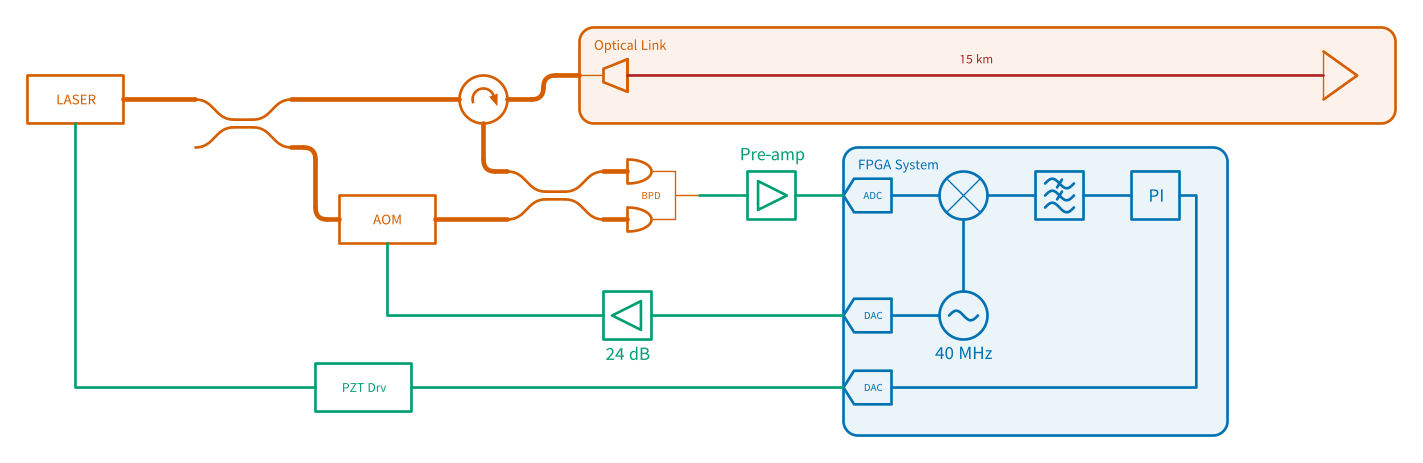
A fibre link stabilised over 15 km — the optics, the RF chain and the FPGA servo in one diagram, exported straight to SVG.
Start here
| Getting started | Install it, get past the first-launch warning, and learn what the window is made of |
| Drawing a diagram | Place symbols, wire them together, and do it quickly |
Then, as you need it
| Wires | The four kinds of wire, routing, waypoints, and why some wires hop |
| Connections | Connectors, splices and soldered joints — and their insertion loss |
| Labels and text | Naming things, and making a label say what a parameter says |
| Organising a diagram | Containers, aligning and distributing |
| Getting it out | Export to SVG, PNG or PDF, copy as an image, Clean View, and the patch-list CSV |
| Your own symbols | Draw a part that isn’t in the library, and share it |
The .dsd file |
What Quickdraw saves, and why it’s plain text |
| Keyboard reference | Every shortcut, on one page |
| Symbol reference | All 88 symbols, with their ports and parameters |
Getting help
Something broken, a symbol missing, or a diagram that came out wrong? Open an issue. Include your Quickdraw version and your operating system.